
How to Contact and Manage Specific Listing Leads on Crexi (Pro Members)
Step 1: Click the menu button in the top left corner.

Step 2: Select My listings from the dropdown menu.

Step 3: Select the listing you want to access —sale, lease, or auction.

Step 4: In the property dashboard, click the Leads button in the left-hand menu to view all leads for that property.

Step 5: Click All Leads to see lead details for the selected listing.

Step 6: Click a specific lead to view contact details, including company information, industry role, actions taken, and the latest activity date.
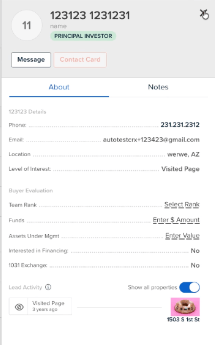
Step 7: To message a specific lead click Contact Lead. To message all leads on a property, click Contact Leads in the top right corner of the leads page.

Step 8: Filter leads by level of interest or industry role before messaging.

Step 9: Click Next to access the message section. Set a subject line, copy a colleague if needed, type your message, and add any relevant links.

Managing All Leads Across Crexi (Pro Members)
Step 1: For a platform-wide lead overview, click the menu in the top left and select Lead Activity.
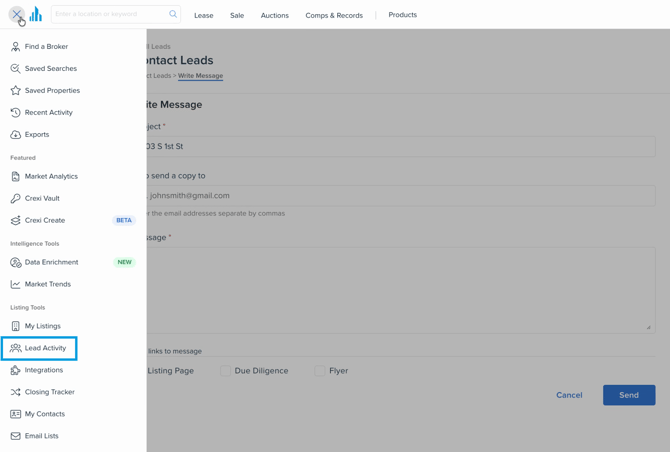
Step 2: Review all your leads—whether from sales or leasing—on a single page.

Step 3: Use filters to refine by property, level of interest, industry role, or a specific date range.

Step 4: Once filtered, click Contact Leads to compose and send a message to the chosen group.

Step 5: To export your leads, click Export Lead Report.

Step 6: Select to export leads from the last 30 days or choose a custom date range (up to the past 12 months).

Step 7: Access the exported file by navigating to the Exports section via the main menu.

Step 8: Download your lead reports or click the three dots next to a file to delete unused exports.

If you are interested in upgrading your account, view our plans here. Need any further assistance, please reach out to us at support@crexi.com or 888.273.0423.